Code
using ICOW.EAD
using Random
using CairoMakie
CairoMakie.activate!(; type="svg")Usage and Examples
This page demonstrates how to use the Expected Annual Damage (EAD) mode to compare flood protection strategies. EAD computes deterministic expected values by integrating over the surge distribution, making it well-suited for screening many candidate strategies or sweeping over scenario parameters.
If you are new to iCOW, start with the Quickstart for a gentler introduction. This page assumes familiarity with the basic concepts (Config, Scenario, Policy, Outcome).
using ICOW.EAD
using Random
using CairoMakie
CairoMakie.activate!(; type="svg")EADConfig encodes the physical and economic characteristics of a coastal city: its geometry (elevation profile, building height, coastline length), the cost structure for each defense type, and damage parameters. The 28 default values are calibrated to a Manhattan-like setting.
config = EADConfig()EADConfig{Float64}(1.5e12, 30.0, 17.0, 2000.0, 43000.0, 1.75, 2.0, 3.0, 0.5, 1000.0, 1.1, 0.95, 1.0, 0.01, 1.25, 0.35, 0.115, 0.4, 3.0, 0.39, 0.03, 1.5, 0.95, 0.05, 1.1, 4.0e9, 1.0, 1.01, 100, QuadratureIntegrator{Float64}(1.0e-6))Key parameters:
The default parameters are inspired by Lower Manhattan’s geography and economy. Customize any parameter via keyword arguments: EADConfig(H_city=20.0, V_city=2.0e12).
An EADScenario specifies a stationary surge hazard using Generalized Extreme Value (GEV) parameters – location, scale, and shape – plus a discount rate and a mean sea level time series. The GEV parameters and discount rate are @continuous parameters, while mean_sea_level is a @timeseries that can represent sea level rise over the planning horizon. The default GEV parameters below are calibrated to The Battery, NYC per Ceres, Forest, and Keller (2019).
n_years = config.n_years
scenario = EADScenario(;
    surge_loc=0.935, surge_scale=0.260, surge_shape=0.030,
    discount_rate=0.02, mean_sea_level=collect(range(0.0; step=0.01, length=n_years)),
)
EADScenario{Float64}(SimOptDecisions.ContinuousParameter{Float64}(0.935, (-5.0, 30.0)), SimOptDecisions.ContinuousParameter{Float64}(0.26, (0.01, 20.0)), SimOptDecisions.ContinuousParameter{Float64}(0.03, (-1.0, 1.0)), SimOptDecisions.ContinuousParameter{Float64}(0.02, (0.0, 1.0)), SimOptDecisions.TimeSeriesParameter{Float64, Int64}([1, 2, 3, 4, 5, 6, 7, 8, 9, 10 … 91, 92, 93, 94, 95, 96, 97, 98, 99, 100], [0.0, 0.01, 0.02, 0.03, 0.04, 0.05, 0.06, 0.07, 0.08, 0.09 … 0.9, 0.91, 0.92, 0.93, 0.94, 0.95, 0.96, 0.97, 0.98, 0.99]))The GEV distribution is the natural choice for annual maximum storm surges. When surge_shape=0.0 the distribution is Gumbel (light-tailed); positive shape gives heavier tails (Fr'echet), negative shape gives bounded tails (Weibull).
EAD mode computes expected damage by integrating over the surge distribution. The integration method is set on EADConfig (not the scenario), since it controls computation, not uncertainty. Two methods are available:
QuadratureIntegrator(rtol=1e-6) – adaptive Gauss-Kronrod quadrature; deterministic, preciseMonteCarloIntegrator(n_samples=1000) – random sampling; stochastic, flexibleconfig_quad = EADConfig(; integrator=QuadratureIntegrator())
config_mc = EADConfig(; integrator=MonteCarloIntegrator(; n_samples=10_000))EADConfig{Float64}(1.5e12, 30.0, 17.0, 2000.0, 43000.0, 1.75, 2.0, 3.0, 0.5, 1000.0, 1.1, 0.95, 1.0, 0.01, 1.25, 0.35, 0.115, 0.4, 3.0, 0.39, 0.03, 1.5, 0.95, 0.05, 1.1, 4.0e9, 1.0, 1.01, 100, MonteCarloIntegrator(10000))Use quadrature for most purposes. Monte Carlo is mainly useful for validation or distributions where quadrature struggles (e.g., heavy mixtures).
A StaticPolicy specifies protection levels using reparameterized fractions that guarantee all physical constraints (\(W + B + D \leq H_{city}\), \(0 \leq P < 1\)) are always satisfied. The policy converts to a FloodDefenses struct with absolute meter values:
policy = StaticPolicy(; a_frac=0.3, w_frac=0.0, b_frac=0.2, r_frac=0.1, P=0.5)
fd = FloodDefenses(policy, config)
fd
FloodDefenses(R=1.7000000000000002m, P=50.0%, D=4.08m, B=1.02m)Different strategies allocate height budget across the three defense types in different ways:
archetypes = [
    (
        "No additional protection",
        StaticPolicy(; a_frac=0.0, w_frac=0.0, b_frac=0.0, r_frac=0.0, P=0.0),
    ),
    ("Dike only", StaticPolicy(; a_frac=0.5, w_frac=0.0, b_frac=0.0, r_frac=0.0, P=0.0)),
    (
        "Withdraw + resist",
        StaticPolicy(; a_frac=0.2, w_frac=0.5, b_frac=1.0, r_frac=0.3, P=0.7),
    ),
    ("Mixed", StaticPolicy(; a_frac=0.3, w_frac=0.1, b_frac=0.2, r_frac=0.1, P=0.5)),
    (
        "High dike + resist",
        StaticPolicy(; a_frac=0.5, w_frac=0.0, b_frac=0.1, r_frac=0.1, P=0.3),
    ),
]
policies = last.(archetypes)
names = first.(archetypes)
fig = Figure(; size=(600, 350))
ax = Axis(
fig[1, 1];
xlabel="Policy",
ylabel="Height (m)",
title="Height allocation by strategy",
xticks=(1:length(archetypes), names),
xticklabelrotation=pi / 6,
)
ws = [FloodDefenses(p, config).W for p in policies]
bs = [FloodDefenses(p, config).B for p in policies]
ds = [FloodDefenses(p, config).D for p in policies]
barplot!(ax, 1:length(archetypes), ws; label="W", color=:dodgerblue)
barplot!(ax, 1:length(archetypes), bs; offset=ws, label="B", color=:orange)
barplot!(ax, 1:length(archetypes), ds; offset=ws .+ bs, label="D", color=:forestgreen)
axislegend(ax; position=:lt)
fig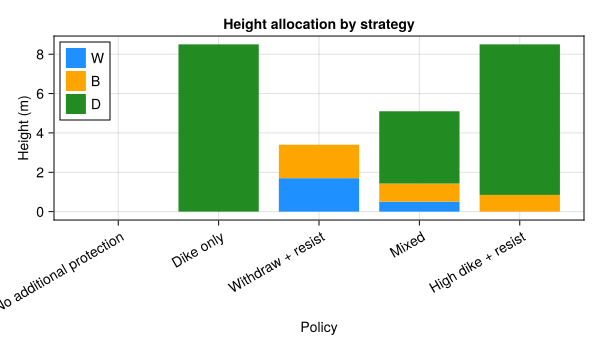
The simulate function runs the full loop: initialize state, apply the policy in year 1, then compute investment costs and expected damage for each year, discounting to present value.
rng = MersenneTwister(42)
outcome = simulate(config, scenario, policy, rng)
outcome
EADOutcome{Float64}(SimOptDecisions.ContinuousParameter{Float64}(1.0134484667281815e10, (-Inf, Inf)), SimOptDecisions.ContinuousParameter{Float64}(8.4655762094207735e9, (-Inf, Inf)))The central question in flood risk management is how much to invest in protection. More investment reduces expected damage but costs money upfront. The optimal strategy minimizes total cost (investment + expected damage).
We use explore() to evaluate all five policies against our scenario in one call. It returns a YAXArrays Dataset with dimensions (policy, scenario):
result = explore(config, [scenario], policies; progress=false)
result
YAXArray Dataset Shared Axes: None Variables with additional axes: Additional Axes: (↓ policy Sampled{Int64} 1:5 ForwardOrdered Regular Points, → scenario Sampled{Int64} 1:1 ForwardOrdered Regular Points) Variables: expected_damage, investment Additional Axes: (↓ policy Sampled{Int64} 1:5 ForwardOrdered Regular Points) Variables: policy_P, policy_a_frac, policy_b_frac, policy_r_frac, policy_w_frac Additional Axes: (↓ scenario Sampled{Int64} 1:1 ForwardOrdered Regular Points) Variables: scenario_discount_rate, scenario_mean_sea_level[100], scenario_mean_sea_level[10], scenario_mean_sea_level[11], scenario_mean_sea_level[12], scenario_mean_sea_level[13], scenario_mean_sea_level[14], scenario_mean_sea_level[15], scenario_mean_sea_level[16], scenario_mean_sea_level[17], scenario_mean_sea_level[18], scenario_mean_sea_level[19], scenario_mean_sea_level[1], scenario_mean_sea_level[20], scenario_mean_sea_level[21], scenario_mean_sea_level[22], scenario_mean_sea_level[23], scenario_mean_sea_level[24], scenario_mean_sea_level[25], scenario_mean_sea_level[26], scenario_mean_sea_level[27], scenario_mean_sea_level[28], scenario_mean_sea_level[29], scenario_mean_sea_level[2], scenario_mean_sea_level[30], scenario_mean_sea_level[31], scenario_mean_sea_level[32], scenario_mean_sea_level[33], scenario_mean_sea_level[34], scenario_mean_sea_level[35], scenario_mean_sea_level[36], scenario_mean_sea_level[37], scenario_mean_sea_level[38], scenario_mean_sea_level[39], scenario_mean_sea_level[3], scenario_mean_sea_level[40], scenario_mean_sea_level[41], scenario_mean_sea_level[42], scenario_mean_sea_level[43], scenario_mean_sea_level[44], scenario_mean_sea_level[45], scenario_mean_sea_level[46], scenario_mean_sea_level[47], scenario_mean_sea_level[48], scenario_mean_sea_level[49], scenario_mean_sea_level[4], scenario_mean_sea_level[50], scenario_mean_sea_level[51], scenario_mean_sea_level[52], scenario_mean_sea_level[53], scenario_mean_sea_level[54], scenario_mean_sea_level[55], scenario_mean_sea_level[56], scenario_mean_sea_level[57], scenario_mean_sea_level[58], scenario_mean_sea_level[59], scenario_mean_sea_level[5], scenario_mean_sea_level[60], scenario_mean_sea_level[61], scenario_mean_sea_level[62], scenario_mean_sea_level[63], scenario_mean_sea_level[64], scenario_mean_sea_level[65], scenario_mean_sea_level[66], scenario_mean_sea_level[67], scenario_mean_sea_level[68], scenario_mean_sea_level[69], scenario_mean_sea_level[6], scenario_mean_sea_level[70], scenario_mean_sea_level[71], scenario_mean_sea_level[72], scenario_mean_sea_level[73], scenario_mean_sea_level[74], scenario_mean_sea_level[75], scenario_mean_sea_level[76], scenario_mean_sea_level[77], scenario_mean_sea_level[78], scenario_mean_sea_level[79], scenario_mean_sea_level[7], scenario_mean_sea_level[80], scenario_mean_sea_level[81], scenario_mean_sea_level[82], scenario_mean_sea_level[83], scenario_mean_sea_level[84], scenario_mean_sea_level[85], scenario_mean_sea_level[86], scenario_mean_sea_level[87], scenario_mean_sea_level[88], scenario_mean_sea_level[89], scenario_mean_sea_level[8], scenario_mean_sea_level[90], scenario_mean_sea_level[91], scenario_mean_sea_level[92], scenario_mean_sea_level[93], scenario_mean_sea_level[94], scenario_mean_sea_level[95], scenario_mean_sea_level[96], scenario_mean_sea_level[97], scenario_mean_sea_level[98], scenario_mean_sea_level[99], scenario_mean_sea_level[9], scenario_surge_loc, scenario_surge_scale, scenario_surge_shape
inv_vals = vec(result[:investment].data) ./ 1e9
dmg_vals = vec(result[:expected_damage].data) ./ 1e9

fig = Figure(; size=(600, 600))
ax = Axis(
    fig[1, 1];
    xlabel="Investment (\$B)",
    ylabel="Expected Damage (\$B)",
    title="Investment vs Expected Damage",
    aspect=1,
)
max_val = max(maximum(inv_vals), maximum(dmg_vals))
iso_costs = range(0, 2 * max_val; length=5)[2:end]
for c in iso_costs
    lines!(ax, [0, c], [c, 0]; color=:gray80, linestyle=:dash)
end
scatter!(ax, inv_vals, dmg_vals; markersize=14, color=:steelblue)
for (i, name) in enumerate(names)
    text!(ax, inv_vals[i], dmg_vals[i]; text=name, fontsize=10, offset=(8, 4))
end
fig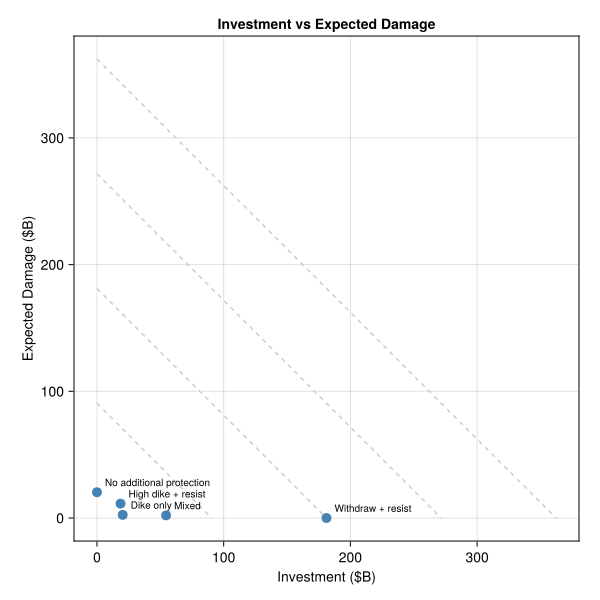
This analysis is risk-neutral: it treats expected damage as the objective. A risk-averse decision-maker would weight tail losses more heavily, which favors larger investments. The Stochastic Details page shows how to analyze tail risk.
Quadrature and Monte Carlo should agree when the number of samples is large enough. Here we verify this for the mixed policy:
config_q = EADConfig(; integrator=QuadratureIntegrator())
config_m = EADConfig(; integrator=MonteCarloIntegrator(; n_samples=10_000))

rng = MersenneTwister(42)
o_quad = simulate(config_q, scenario, policy, rng)
rng = MersenneTwister(42)
o_mc = simulate(config_m, scenario, policy, rng)
EADOutcome{Float64}(SimOptDecisions.ContinuousParameter{Float64}(1.0134484667281815e10, (-Inf, Inf)), SimOptDecisions.ContinuousParameter{Float64}(8.484804645267512e9, (-Inf, Inf)))